Showing posts with label Tips-and-tricks. Show all posts

Wednesday, July 13, 2011

Windows 7 will not boot right? Learn how to recover


Created with Windows Vista, Startup Repair is even better in Windows 7. This tool is able to correct certain errors that prevent your operating system to be initialized, which usually happens by the absence of errors or system files. The tool does not fix hardware failures, errors such as hard disk or incompatible memory.

Startup Repair is located in the "System Recovery Options", where there are several diagnostic and recovery tools, and is only accessed before initialization, also known as boot.

Step 1. Before accessing the menu "System Recovery Options" on the computer, remove all floppy disks, CDs and DVDs and restart using the on / off switch. If you are using a Tablet PC or a touch a computer, connect a keyboard.

Step 2. If your computer has only one operating system installed, press the F8 key while the computer is restarted, this before the Windows logo appears. If your computer has more than one operating system, use the keyboard arrows to select the operating system you want to repair, holding down the F8 key.

Step 3. On the "Advanced Boot Options", select "Repair your computer" and press Enter on your keyboard. (If "Repair your computer" is not listed as an option, you do not have the recovery options pre-installed or your network administrator has turned off).
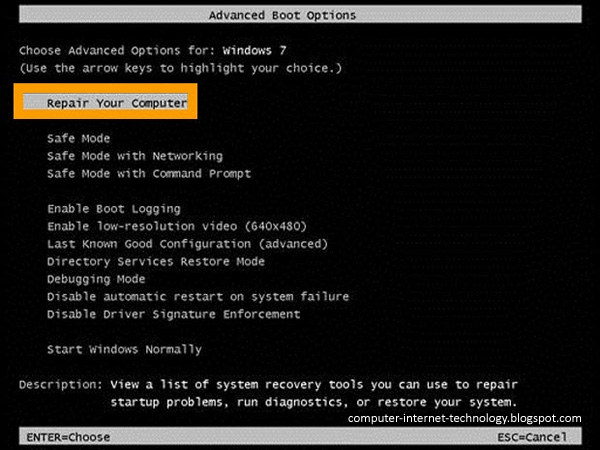
 
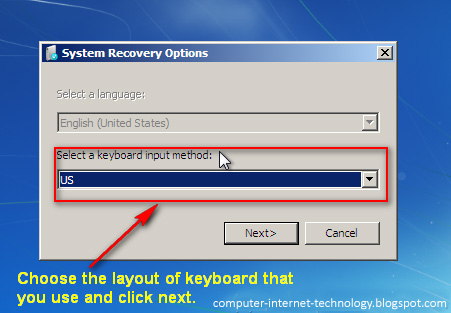
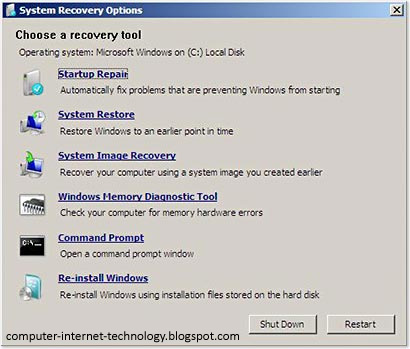
Step 4. Select your keyboard layout and click "Next" (Next). From the "System Recovery Options", click "Startup Repair" and when the computer finishes checking and correction, restart. The fix has been successful if Windows starts normally, without errors
 

The following steps are only useful for those who need or prefer to recover using the Windows installation CD to repair the system. This will occur as needed when the computer is damaged to the point that you can not even access the menu "Options Windows Recovery."

Step 5. Insert the Windows installation disc. Restart your computer and watch the screen to boot from the CD. When prompted, press any key.

Step 6. After clicking on any key as requested in the previous step, you should get the screen of Windows Setup. Click on "Repair Computer".

Step 7. You will be directed to screen "System Recovery Options." Just select your language and click "next". Follow from Step 3, requesting a correction startup.

Step 8. The computer displays a screen with system errors recovered. After that, simply restart.

This is a rather useful and recommended when you encounter problems when you start Windows, but if these steps do not resolve, you probably need to format the drive and do a clean install of Windows , but worth a try. Always remember to keep up the backup of your most important files.

Windows 7 will not boot right? Learn how to recover


Created with Windows Vista, Startup Repair is even better in Windows 7. This tool is able to correct certain errors that prevent your operating system to be initialized, which usually happens by the absence of errors or system files. The tool does not fix hardware failures, errors such as hard disk or incompatible memory.

Startup Repair is located in the "System Recovery Options", where there are several diagnostic and recovery tools, and is only accessed before initialization, also known as boot.

Step 1. Before accessing the menu "System Recovery Options" on the computer, remove all floppy disks, CDs and DVDs and restart using the on / off switch. If you are using a Tablet PC or a touch a computer, connect a keyboard.

Step 2. If your computer has only one operating system installed, press the F8 key while the computer is restarted, this before the Windows logo appears. If your computer has more than one operating system, use the keyboard arrows to select the operating system you want to repair, holding down the F8 key.

Step 3. On the "Advanced Boot Options", select "Repair your computer" and press Enter on your keyboard. (If "Repair your computer" is not listed as an option, you do not have the recovery options pre-installed or your network administrator has turned off).
 
Step 4. Select your keyboard layout and click "Next" (Next). From the "System Recovery Options", click "Startup Repair" and when the computer finishes checking and correction, restart. The fix has been successful if Windows starts normally, without errors
 

The following steps are only useful for those who need or prefer to recover using the Windows installation CD to repair the system. This will occur as needed when the computer is damaged to the point that you can not even access the menu "Options Windows Recovery."

Step 5. Insert the Windows installation disc. Restart your computer and watch the screen to boot from the CD. When prompted, press any key.

Step 6. After clicking on any key as requested in the previous step, you should get the screen of Windows Setup. Click on "Repair Computer".

Step 7. You will be directed to screen "System Recovery Options." Just select your language and click "next". Follow from Step 3, requesting a correction startup.

Step 8. The computer displays a screen with system errors recovered. After that, simply restart.

This is a rather useful and recommended when you encounter problems when you start Windows, but if these steps do not resolve, you probably need to format the drive and do a clean install of Windows , but worth a try. Always remember to keep up the backup of your most important files.

Sunday, May 29, 2011

CPM Program Make Money YMads.com


I own until now still not understood well, even I also often read from the master of your blog / web's top Indonesia just let me understand how true that Internet business. Formerly also a list of PTC, PPC and Affiliate which has yet to show success. "Keep the spirit!" Business Blog Advice from a friend, I suggested a list of CPM YMads.com. Although fairly new online business programs, but how free and easy YMads.com leveling course. Companions can list here. CPM Program is a Cost Per Million, or cost per impression that we pay every IMPRES that we get from the blog that we install. This can be as an alternative to the dollar online search than PPC Google Adsense,or any other Internet business.

Excess YMads.com from other programs such as Internet business that I've ever played (PromoteBurner.com, Bigextracash.com) payout or payment is sent directly to our Paypal (Paypal can list here) and there is no minimum payment. So little likelihood of this YMads.com Scam or fraud because the money directly into Paypal. Other advantages are also ads shown loading fast and lightweight.

YMads.com also pay us if there is a sign up through our referial or commonly known as affiliate programs. Once again this is not a Scam or YMads.com fraud because it has been proven to pay me. May I see proof of payment here.Hopefully the info provided Stores Blog useful to all friends again Learning Blog Basic knowledge of business and also online. How YMads.com CPM Program registration is very easy like other Internet Business program enrollment. The first friend to do is sign up here

I am happy to share you all. this above image my current earning dashboard. join and earn. Best of luck friends.

CPM Program Make Money YMads.com


I own until now still not understood well, even I also often read from the master of your blog / web's top Indonesia just let me understand how true that Internet business. Formerly also a list of PTC, PPC and Affiliate which has yet to show success. "Keep the spirit!" Business Blog Advice from a friend, I suggested a list of CPM YMads.com. Although fairly new online business programs, but how free and easy YMads.com leveling course. Companions can list here. CPM Program is a Cost Per Million, or cost per impression that we pay every IMPRES that we get from the blog that we install. This can be as an alternative to the dollar online search than PPC Google Adsense,or any other Internet business.

Excess YMads.com from other programs such as Internet business that I've ever played (PromoteBurner.com, Bigextracash.com) payout or payment is sent directly to our Paypal (Paypal can list here) and there is no minimum payment. So little likelihood of this YMads.com Scam or fraud because the money directly into Paypal. Other advantages are also ads shown loading fast and lightweight.

YMads.com also pay us if there is a sign up through our referial or commonly known as affiliate programs. Once again this is not a Scam or YMads.com fraud because it has been proven to pay me. May I see proof of payment here.Hopefully the info provided Stores Blog useful to all friends again Learning Blog Basic knowledge of business and also online. How YMads.com CPM Program registration is very easy like other Internet Business program enrollment. The first friend to do is sign up here

I am happy to share you all. this above image my current earning dashboard. join and earn. Best of luck friends.

Sunday, May 15, 2011

Top Tech Tips organizations

This technology can be transformed, there are no boundaries, and sometimes quite overwhelming. There are millions of ways to accomplish the task, and millions of jobs. And 'important that more effective tools to meet the growing needs of modern global standards. Here are four tips that technology will change your life, while more than one.

If you dream that you forgot or lost your password, PayPal, seen as unfit to-date information to steal your watch. The school passwords, lists and tables is a full-time pain in the Palm Pilot, but if the information that will save you a lot of time communicating. There are many applications that wirelessly sync your phone home or office.

For example, Evernote (free application for the iPhone) on all computers that are taken for routine access. Try to list in the category folder to organize. Keep your password to organize grocery lists, photos and daily activities planned to highlight the market and create subfolders.

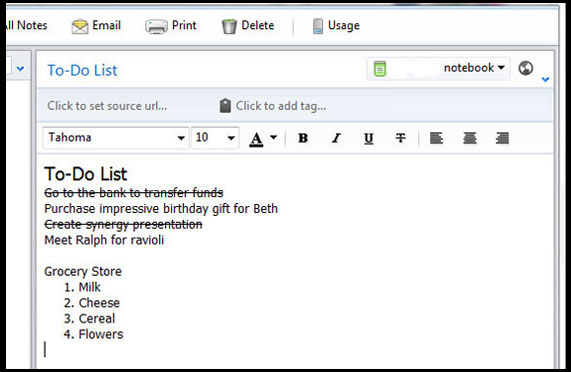
Evernote allows you to easily capture the notes in four ways: by typing on the keyboard 1 2 3 images of the existing dial-up voice recording, photo 4 of Evernote, I never saw the towel!

2. Access to information activities during the day to visit the office on Saturday. CompanionLink Software as a can synchronize contacts, calendar, tasks, notes, and on the phone, allowing access to data anywhere, a mobile phone. It supports a large number of synchronization programs (including Outlook, ACT! Skyscraper E) and cellular phones (such as Android, iPhone, BlackBerry and more). To make matters worse for the free trial so you can test.

3. Going electronic is environmentally friendly, what to do and quickly de-clutter your life. Mobile phones with cameras and scanners are large photos of unusual opportunity. Empty wallet card scanning them with your phone and send it.

Scan Genius is a great application to try. Fast rules taking photos, messages and important notes. Send baseball with the exception of my grandmother's birthday theme? Scan your computer to organize them for years, and move quickly to strike nostalgic.

4. Keep your money in the bank has seen incredible growth in various accounts, but is not available in real time. The operations that are not directly over the Internet, you can expect costs to continue to work manually. But this does not mean that you hit your account to pieces. Applications such as balance, you can directly control the progress of operations on a cell phone.

I do not need anything. Pageonce consolidation of applications, such as bank accounts, credit cards and information on costs and create reports tell you where the money goes. In combination with the ability to synchronize information on your desktop, this is a very effective way to manage money and save valuable time. He was a guest post from iPhone Irene Jaelithe.

Have a very happy life together full of technology and productivity, using the best synchronization software.

Top Tech Tips organizations

This technology can be transformed, there are no boundaries, and sometimes quite overwhelming. There are millions of ways to accomplish the task, and millions of jobs. And 'important that more effective tools to meet the growing needs of modern global standards. Here are four tips that technology will change your life, while more than one.

If you dream that you forgot or lost your password, PayPal, seen as unfit to-date information to steal your watch. The school passwords, lists and tables is a full-time pain in the Palm Pilot, but if the information that will save you a lot of time communicating. There are many applications that wirelessly sync your phone home or office.

For example, Evernote (free application for the iPhone) on all computers that are taken for routine access. Try to list in the category folder to organize. Keep your password to organize grocery lists, photos and daily activities planned to highlight the market and create subfolders.

Evernote allows you to easily capture the notes in four ways: by typing on the keyboard 1 2 3 images of the existing dial-up voice recording, photo 4 of Evernote, I never saw the towel!

2. Access to information activities during the day to visit the office on Saturday. CompanionLink Software as a can synchronize contacts, calendar, tasks, notes, and on the phone, allowing access to data anywhere, a mobile phone. It supports a large number of synchronization programs (including Outlook, ACT! Skyscraper E) and cellular phones (such as Android, iPhone, BlackBerry and more). To make matters worse for the free trial so you can test.

3. Going electronic is environmentally friendly, what to do and quickly de-clutter your life. Mobile phones with cameras and scanners are large photos of unusual opportunity. Empty wallet card scanning them with your phone and send it.

Scan Genius is a great application to try. Fast rules taking photos, messages and important notes. Send baseball with the exception of my grandmother's birthday theme? Scan your computer to organize them for years, and move quickly to strike nostalgic.

4. Keep your money in the bank has seen incredible growth in various accounts, but is not available in real time. The operations that are not directly over the Internet, you can expect costs to continue to work manually. But this does not mean that you hit your account to pieces. Applications such as balance, you can directly control the progress of operations on a cell phone.

I do not need anything. Pageonce consolidation of applications, such as bank accounts, credit cards and information on costs and create reports tell you where the money goes. In combination with the ability to synchronize information on your desktop, this is a very effective way to manage money and save valuable time. He was a guest post from iPhone Irene Jaelithe.

Have a very happy life together full of technology and productivity, using the best synchronization software.

Monday, April 25, 2011

Top 7 largest freelance websites

Freelancer : Freelancer.com is the world's largest market for outsourcing and crowd sourcing to small businesses. We have thousands of satisfied clients around the world.

Elance : As the first platform in the world for work online, Elance helps companies hire and manage the clouds. For business, team or project on the basis of hourly Elance offers direct access to qualified specialists, which provides online tools to do the work, as advanced, pay for performance.

Odesk : Odessa is an online marketplace for groups, with the best business model for employers and contractors. Our unique approach ensures that the hours billed to employers for the time being, provided that the contractor has paid for the hours worked per hour.

Project4hire.com : independent market, customers in the world, projects and tenders for companies in these projects work out. We free software developers, web developers, translators and other talented professionals from Germany, Britain, Canada, South America, India, Eastern Europe (Russia, Ukraine, Romania) and the other in the world registered on this site offer competing services. It costs nothing to the project reviews to the public. It costs nothing to contractors bid for the project. Contractors receive only a small percentage of the value of the project, which is expected to pay.

Scriptlance : The script is running free market system uses reverse auctions for buyers to find developers and designers of projects to be outsourced. Freelancers bid on projects posted by third parties, which then exit the winners chosen for their programming.

freelance.com : Has the skills freelance.com qualified suppliers / autonomic computing, business, marketing and communications, journalism, translation, training and advice. These companies - and employers - how to use the services freelance.com to help them evaluate, select and specify the right for every job. Freelance.com both parties benefit from the expertise of an independent operator who is responsible, because it contains a list of skills and support in the selection process, as a professional.

Guru.com is the free market. This allows businesses, professionals can be found on the commission. Founded in 1998 in Pittsburgh eMoonlighter.com and always there is a high-tech bubble of the late 1990s to survive. eMoonlighter.com really low-budget, only U.S. $ 400 000 and still very profitable, due to customer satisfaction and efficiency.
I hope it's help to freelancers.
By : Anand (twitter) - (i am waiting for your feedback)

Top 7 largest freelance websites

Freelancer : Freelancer.com is the world's largest market for outsourcing and crowd sourcing to small businesses. We have thousands of satisfied clients around the world.

Elance : As the first platform in the world for work online, Elance helps companies hire and manage the clouds. For business, team or project on the basis of hourly Elance offers direct access to qualified specialists, which provides online tools to do the work, as advanced, pay for performance.

Odesk : Odessa is an online marketplace for groups, with the best business model for employers and contractors. Our unique approach ensures that the hours billed to employers for the time being, provided that the contractor has paid for the hours worked per hour.

Project4hire.com : independent market, customers in the world, projects and tenders for companies in these projects work out. We free software developers, web developers, translators and other talented professionals from Germany, Britain, Canada, South America, India, Eastern Europe (Russia, Ukraine, Romania) and the other in the world registered on this site offer competing services. It costs nothing to the project reviews to the public. It costs nothing to contractors bid for the project. Contractors receive only a small percentage of the value of the project, which is expected to pay.

Scriptlance : The script is running free market system uses reverse auctions for buyers to find developers and designers of projects to be outsourced. Freelancers bid on projects posted by third parties, which then exit the winners chosen for their programming.

freelance.com : Has the skills freelance.com qualified suppliers / autonomic computing, business, marketing and communications, journalism, translation, training and advice. These companies - and employers - how to use the services freelance.com to help them evaluate, select and specify the right for every job. Freelance.com both parties benefit from the expertise of an independent operator who is responsible, because it contains a list of skills and support in the selection process, as a professional.

Guru.com is the free market. This allows businesses, professionals can be found on the commission. Founded in 1998 in Pittsburgh eMoonlighter.com and always there is a high-tech bubble of the late 1990s to survive. eMoonlighter.com really low-budget, only U.S. $ 400 000 and still very profitable, due to customer satisfaction and efficiency.
I hope it's help to freelancers.
By : Anand (twitter) - (i am waiting for your feedback)

Monday, April 18, 2011

How to : Windows XP Taskbar fix "

The "taskbar" in Windows XP fix.
 
Solution 1:

  Right in the free area of the "Taskbar" click with -> check mark "in taskbar" fix by clicking on top.  To fix the "system tray" lift -> uncheck "lock taskbar" by clicking remove it.

  Solution 2:


  Use the right mouse button in the free area of the "system tray" or the "Start"    click -> Properties.  In the Properties window, taskbar and Start Menu "tab, if necessary," Taskbar "switch.  Fix "Set - Task Bar -> hook under the taskbar display" "at"> "OK" to confirm.  To fix the "system tray" lift - taskbar fix "to remove the hook from"> -> "OK" to confirm.

  Solution 3:

  "Windows key + R" to "run dialog" Open With "gpedit.msc" in the search field and click "OK" to confirm.  In the "Group Policy" select the following path:

  User Configuration -> Administrative Templates -> Start Menu and Taskbar "

  In the "Start Menu and Taskbar" fix "the" taskbar entry and search with a double click.  fix "in the Properties window, taskbar, the radio button to Enabled" set "->" OK "to confirm.  To fix the "system tray" lift - the radio button to "Not Configured" position> -> "OK" to confirm.  both cases, a "new start" to carry out in order to activate your changes.

  Note: "Lock the Taskbar" (solution 1 and 2) is "activating" solution 3 is grayed out when not clickable.
 
Solution 4:

  "Windows key + R" to "run dialog" Open With "regedit" in the search field and click "OK" to confirm.  In the "Registry Editor" following "key" to navigate to:

  HKEY_CURRENT_USER \ Software \ Microsoft \ Windows \ CurrentVersion \ Policies \ Explorer

  Right-click on the key "Explorer" -> "New" -> "DWORD Value.  The main window, newly created DWORD value in "LockTaskbar Rename.  Right-click on "LockTaskbar" -> "Change."  In the "Edit DWORD Value," the "value" to "1" Change -> "OK" to confirm.  To fix the "system tray" lift - the DWORD value "LockTaskbar" Delete>.  both cases, a "new start" to carry out in order to activate your changes.

How to : Windows XP Taskbar fix "

The "taskbar" in Windows XP fix.
 
Solution 1:

  Right in the free area of the "Taskbar" click with -> check mark "in taskbar" fix by clicking on top.  To fix the "system tray" lift -> uncheck "lock taskbar" by clicking remove it.

  Solution 2:


  Use the right mouse button in the free area of the "system tray" or the "Start"    click -> Properties.  In the Properties window, taskbar and Start Menu "tab, if necessary," Taskbar "switch.  Fix "Set - Task Bar -> hook under the taskbar display" "at"> "OK" to confirm.  To fix the "system tray" lift - taskbar fix "to remove the hook from"> -> "OK" to confirm.

  Solution 3:

  "Windows key + R" to "run dialog" Open With "gpedit.msc" in the search field and click "OK" to confirm.  In the "Group Policy" select the following path:

  User Configuration -> Administrative Templates -> Start Menu and Taskbar "

  In the "Start Menu and Taskbar" fix "the" taskbar entry and search with a double click.  fix "in the Properties window, taskbar, the radio button to Enabled" set "->" OK "to confirm.  To fix the "system tray" lift - the radio button to "Not Configured" position> -> "OK" to confirm.  both cases, a "new start" to carry out in order to activate your changes.

  Note: "Lock the Taskbar" (solution 1 and 2) is "activating" solution 3 is grayed out when not clickable.
 
Solution 4:

  "Windows key + R" to "run dialog" Open With "regedit" in the search field and click "OK" to confirm.  In the "Registry Editor" following "key" to navigate to:

  HKEY_CURRENT_USER \ Software \ Microsoft \ Windows \ CurrentVersion \ Policies \ Explorer

  Right-click on the key "Explorer" -> "New" -> "DWORD Value.  The main window, newly created DWORD value in "LockTaskbar Rename.  Right-click on "LockTaskbar" -> "Change."  In the "Edit DWORD Value," the "value" to "1" Change -> "OK" to confirm.  To fix the "system tray" lift - the DWORD value "LockTaskbar" Delete>.  both cases, a "new start" to carry out in order to activate your changes.

How to Windows Vista - "DNS cache" delete, clear

Clear DNS Cache in Windows Vista, empty.
 
Solution:

  "Windows key + R" to "run dialog" Open With "cmd" into the search box and "OK" to confirm.  the "Command Prompt" command line "ipconfig / flushdns" and enter in the "Enter" key to confirm.

Tip: "ipconfig / displaydns", the "DNS cache" before and checked it.
Publish Post

How to Windows Vista - "DNS cache" delete, clear

Clear DNS Cache in Windows Vista, empty.
 
Solution:

  "Windows key + R" to "run dialog" Open With "cmd" into the search box and "OK" to confirm.  the "Command Prompt" command line "ipconfig / flushdns" and enter in the "Enter" key to confirm.

Tip: "ipconfig / displaydns", the "DNS cache" before and checked it.
Publish Post

Windows Vista - Extended Context Menu "" Run

The Advanced menu in Windows Vista open call. Hidden messages, commands in the "context menu" Show.
Solution:

The "Shift" key (Shift key) while pressing the right mouse button on a file or folder, hold down. Thus, the following important commands for files and / or folders are visible:
  • Pin to Start Menu
  • Add to Quick Launch bar
  • Copy as Path
  • Open Command Window Here

Windows Vista - Extended Context Menu "" Run

The Advanced menu in Windows Vista open call. Hidden messages, commands in the "context menu" Show.
Solution:

The "Shift" key (Shift key) while pressing the right mouse button on a file or folder, hold down. Thus, the following important commands for files and / or folders are visible:
  • Pin to Start Menu
  • Add to Quick Launch bar
  • Copy as Path
  • Open Command Window Here

Sunday, April 17, 2011

How to : Lots of tips for choosing secure passwords

When working on the computer and the internet, it happens all the time that you must choose a password. Passwords are for example the application of their own computer, you need to use an e-mail account for online banking or shopping in online stores.

Since it is easy with this password-abundance lose track, one is quickly tempted to choose simple passwords to use for different services and over again the same password or the passwords down right next to the computer on a piece of paper.

Very easy to decipher passwords such as a name, nickname or a name in combination with a birthday (eg Sabine49 or Schatzi05101951). A password that consists solely of letters is far too easy to find out.

Who can decipher my password?
  • The risk that a password should be cracked is, of course, not only when it is broken into a home. This case is fortunately rather rare.
  • But while working on the computer and the Internet, there are other dangers that you should be aware of any case, so that negligent behavior can be avoided.
  • For example, by fraud (in computer jargon, these hackers called) used specially designed programs that are supplied with the full knowledge and Duden dictionaries.
  • All words that have meaning are thus not a good choice for a secure password.
How can I choose a secure password?
  • It is important that is always a combination of letters (with upper and lowercase), numbers, and whenever possible characters (eg -?!_) chosen as the password.
  • In addition, selected letters long word with no direct relevance to be.
  • Also, a password is too short to crack too easily. It should have at least 8-10 characters.
  • It is also very important that you respect it, periodic change your passwords, and that you continue to give them another person to (especially not on an email message).

For many providers on the Internet, most of these conditions are predetermined fortunate to.

And as I can remember multiple passwords?

This is a very good question, have to manage, especially since most PC and Internet users a number of passwords.

A very good way is to build a crib, and as a letter-number-letter combination of a set of create, only you can you remember. Here's an example:.

From the set: M a L i st ieblingsessen P asta m it G orgonzolasoße u nd S ALAT


You can create the letter combination MLiPmGuS. Now you are missing numbers and signs. So you could from MLiPmGuS password MLiPmGuS-2 and make you realize that you prefer pasta 2 times a week on eating :-)

Of course this is only a theoretical example and I'm sure you can think of better and, above all, secure letter-number combinations of characters for your passwords.

Multiple passwords for different services you can easily remember then you still, always adding the same root password, so MLiPmGuS-2 uses, and then a corresponding key for the service (eg gm for Gmail) on your root password pending.

So you have you write down your passwords are not guaranteed, and if you change your passwords, you can do this the same for all your services done at the same time and choose a new password root.

How to : Lots of tips for choosing secure passwords

When working on the computer and the internet, it happens all the time that you must choose a password. Passwords are for example the application of their own computer, you need to use an e-mail account for online banking or shopping in online stores.

Since it is easy with this password-abundance lose track, one is quickly tempted to choose simple passwords to use for different services and over again the same password or the passwords down right next to the computer on a piece of paper.

Very easy to decipher passwords such as a name, nickname or a name in combination with a birthday (eg Sabine49 or Schatzi05101951). A password that consists solely of letters is far too easy to find out.

Who can decipher my password?
  • The risk that a password should be cracked is, of course, not only when it is broken into a home. This case is fortunately rather rare.
  • But while working on the computer and the Internet, there are other dangers that you should be aware of any case, so that negligent behavior can be avoided.
  • For example, by fraud (in computer jargon, these hackers called) used specially designed programs that are supplied with the full knowledge and Duden dictionaries.
  • All words that have meaning are thus not a good choice for a secure password.
How can I choose a secure password?
  • It is important that is always a combination of letters (with upper and lowercase), numbers, and whenever possible characters (eg -?!_) chosen as the password.
  • In addition, selected letters long word with no direct relevance to be.
  • Also, a password is too short to crack too easily. It should have at least 8-10 characters.
  • It is also very important that you respect it, periodic change your passwords, and that you continue to give them another person to (especially not on an email message).

For many providers on the Internet, most of these conditions are predetermined fortunate to.

And as I can remember multiple passwords?

This is a very good question, have to manage, especially since most PC and Internet users a number of passwords.

A very good way is to build a crib, and as a letter-number-letter combination of a set of create, only you can you remember. Here's an example:.

From the set: M a L i st ieblingsessen P asta m it G orgonzolasoße u nd S ALAT


You can create the letter combination MLiPmGuS. Now you are missing numbers and signs. So you could from MLiPmGuS password MLiPmGuS-2 and make you realize that you prefer pasta 2 times a week on eating :-)

Of course this is only a theoretical example and I'm sure you can think of better and, above all, secure letter-number combinations of characters for your passwords.

Multiple passwords for different services you can easily remember then you still, always adding the same root password, so MLiPmGuS-2 uses, and then a corresponding key for the service (eg gm for Gmail) on your root password pending.

So you have you write down your passwords are not guaranteed, and if you change your passwords, you can do this the same for all your services done at the same time and choose a new password root.

Wednesday, April 13, 2011

How to : Convert File Formats Online With the Help Zamzar.com

Convert File Formats Online With the Help Zamzar.com . These moments we find and deal with many different types of files with a variety of different formats. With the wide variety of file formats may be able to make us dizzy because we are required to have many applications that can be used to open each type of file it is. While to obtain these applications sometimes we have difficulties.

To overcome this, we can change the file format in advance so that applications that we have to recognize the file format. With the change, first, we probably only need one or several applications just to open many file types currently available.

Well, the next problem is that sometimes we have difficulty to get an application that can convert various kinds of existing file formats.

But we do not need to worry because we can use the help Zamzar.com. Zamzar.com is one free service that can help us to do conversions from many types of file formats to a variety of other file formats.

The advantage of this service is the support of nearly all types of file formats that exist. And also the conversion process is spelled out pretty quickly. But this depends also from an internet connection that we use, the better the internet connection that we use the process the sooner.

Oh, yes conversion results will be sent to the email address belong to us. Therefore, we must enter an email address first before pressing the "Convert".

The steps to convert the file format with Zamzar.com is very easy, it only needs 4 stages.

First, open the page Zamzar.com so that we will find a page like the picture below.


Second, the "Step 1" click the "Browse" and then locate and find the file you want us to our computer conversion.

Third, then on "Step 2" specify the type of file conversion format that we want.

Keempat, in "Step 3" enter the email address where we will post the results of the conversion process that we will do.

Fifth, the "Step 4", click the "Convert" to start pengkor versian.

Sixth, wait a while until we will find the "File Upload Complete" and as soon as possible conversion results will immediately be sent to our email address. We will be given link to download the results of the conversion.


Oh, yes immediately download the converted file from the link that has been given to us because the file is only stored for one day only. The rest of the files will be removed at the database Zamzar.com.

Good Luck...

How to : Convert File Formats Online With the Help Zamzar.com

Convert File Formats Online With the Help Zamzar.com . These moments we find and deal with many different types of files with a variety of different formats. With the wide variety of file formats may be able to make us dizzy because we are required to have many applications that can be used to open each type of file it is. While to obtain these applications sometimes we have difficulties.

To overcome this, we can change the file format in advance so that applications that we have to recognize the file format. With the change, first, we probably only need one or several applications just to open many file types currently available.

Well, the next problem is that sometimes we have difficulty to get an application that can convert various kinds of existing file formats.

But we do not need to worry because we can use the help Zamzar.com. Zamzar.com is one free service that can help us to do conversions from many types of file formats to a variety of other file formats.

The advantage of this service is the support of nearly all types of file formats that exist. And also the conversion process is spelled out pretty quickly. But this depends also from an internet connection that we use, the better the internet connection that we use the process the sooner.

Oh, yes conversion results will be sent to the email address belong to us. Therefore, we must enter an email address first before pressing the "Convert".

The steps to convert the file format with Zamzar.com is very easy, it only needs 4 stages.

First, open the page Zamzar.com so that we will find a page like the picture below.


Second, the "Step 1" click the "Browse" and then locate and find the file you want us to our computer conversion.

Third, then on "Step 2" specify the type of file conversion format that we want.

Keempat, in "Step 3" enter the email address where we will post the results of the conversion process that we will do.

Fifth, the "Step 4", click the "Convert" to start pengkor versian.

Sixth, wait a while until we will find the "File Upload Complete" and as soon as possible conversion results will immediately be sent to our email address. We will be given link to download the results of the conversion.


Oh, yes immediately download the converted file from the link that has been given to us because the file is only stored for one day only. The rest of the files will be removed at the database Zamzar.com.

Good Luck...

Monday, April 11, 2011

Folder Trick Quick Search

You must have open and save files in specific folders on your hard drive. And when you work with computers more often, then find the Open dialog box or Save As, then surely it will require a lot of time to navigate or find the desired folder.

Here are tips and tricks on the computer to find the folder quickly, especially using the features in Windows 7 operating system. You can use the Recent Places features are available under 'Favorites' when you open a Windows Explorer window.

Recent Places are not the same as the Recent Documents in Windows Start menu. When you click the Recent Places, will be appearing or folders that you've opened before. Click one of the desired folder, and open. No need to waste time finding a lot of drive and subfolders.

If you do not see the option for Recent Places in the left pane of Windows Explorer, so you can make it visible, by choosing organize -> Layout -> Navigation Pane.

Good luck.

Folder Trick Quick Search

You must have open and save files in specific folders on your hard drive. And when you work with computers more often, then find the Open dialog box or Save As, then surely it will require a lot of time to navigate or find the desired folder.

Here are tips and tricks on the computer to find the folder quickly, especially using the features in Windows 7 operating system. You can use the Recent Places features are available under 'Favorites' when you open a Windows Explorer window.

Recent Places are not the same as the Recent Documents in Windows Start menu. When you click the Recent Places, will be appearing or folders that you've opened before. Click one of the desired folder, and open. No need to waste time finding a lot of drive and subfolders.

If you do not see the option for Recent Places in the left pane of Windows Explorer, so you can make it visible, by choosing organize -> Layout -> Navigation Pane.

Good luck.