Showing posts with label Blogger Templates. Show all posts
Showing posts with label Blogger Templates. Show all posts
Sunday, July 13, 2008

Monday, June 30, 2008
24 Sources of Free Blogger Blogspot Templates

I understand that a lot of bloggers using Blogger.com are having hard time to find templates that suit their need. I am finding it hard to search for good blogger's templates too.
So, I decided to search for all the sites that offer free blogspot templates for all bloggers. Check out the list and I think you would find them useful.
The list of 24 Blogger's Templates Sites:
- Mashable
- FinalSense
- Cool Templates
- Blogger Blog Template
- Pyzam
- Free Blogger Templates
- eBlog Templates
- Blogger Templates Directory
- Jackbook
- Free Template
- Gecko and Fly
- IT Mag Blogger Template
- Carl Galloway
- Blogger Buster
- Thurs Templates
- PlanetBlogTemplate
- BlogCrowds
- SuckmyLolly
- Free Templates
- BlogSkins
- Free Layout
- Ustadz
- Blogspot Templates
- x-Template
It is 24 sites in total. Some of the sites have more than 100 templates. So, take your time and browse through these 24 blogger templates sites to find your favorite templates. Enjoy and have fun.
Tuesday, June 17, 2008
Earn Money From Blog in New Template
I always wanted a simple template for my blog and I found a template which is quite simple for Earn Money From Blog. I hope this template will be a great change to Earn Money From Blog.
I have cleared all the useless advertisements on my blog and now I only have the CripsAds on my blog. Now, my blog looks clean and tidy.
I hope you will enjoy reading my blog and I will keep on posting to keep my blog updated.
I have cleared all the useless advertisements on my blog and now I only have the CripsAds on my blog. Now, my blog looks clean and tidy.
I hope you will enjoy reading my blog and I will keep on posting to keep my blog updated.
Tuesday, June 10, 2008
20 Best Blogger Template
Are you going to change your blogspot template? You might find this post useful and helpful. I listed out the Top 20 Blogger Templates for you. All the 20 Blogger Templates listed will be free and all of them are in the XML format.
This post is a MUST READ if you are searching for Blogger's Template. I have collected all the best and nice looking Blogger's Templates from the internet. So, please read on to have a look at the nice looking Blogger' Templates and Download them.
1. Magazine Blogger Template:

>>Download Magazine Blogger Template
2. WP Premium Blogger Template:

>>Download WP Premium Blogger Template
3. Ads Theme Blogger Template

>>Download Ads Theme Blogger Template
4. Polaroid Blogger Template

>>Download Polaroid Blogger Template
5. Dilectio Blogger Template

>>DownloadDilectio Blogger Template
6. Refresh Blogger Template

>>Download Refresh Blogger Template
7. Dark Spark Blogger Template

>>Download Dark Spark Blogger Template
8. Forte Blogger Template

>>Download Forte Blogger Template
9. Art imagination Blogger Template

>>Download Art Imagination Blogger Template
10. Curved Blogger Template

>>Download Curved Blogger Template
11. Vertigo Blogger Template

>>Download Vertigo Blogger Template
12. Revolution Blogger Template

>>Download Revolution Blogger Template
13. Blue Blog Blogger Template

>>Download Blue Blog Blogger Template
14. Facebook Blogger Template

>>Download Facebook Blogger Template
15. Indomagz Premium Blogger Template

>>Download Indomagz Premium Blogger Template
16. is_Simple Blogger Template

>>Download is_Simple Blogger Template
17. Soo Simple Blogger Template

>>Download Soo Simple Blogger Template
18. Blogy Rosa Blogger Template

>>Download Blogy Rosa Blogger Template
19. Leia Blogger Template

>>Download Leia Blogger Template
20. Xbox Blogger Template

>>Download Xbox Blogger Template
This post is a MUST READ if you are searching for Blogger's Template. I have collected all the best and nice looking Blogger's Templates from the internet. So, please read on to have a look at the nice looking Blogger' Templates and Download them.
1. Magazine Blogger Template:

>>Download Magazine Blogger Template
2. WP Premium Blogger Template:

>>Download WP Premium Blogger Template
3. Ads Theme Blogger Template

>>Download Ads Theme Blogger Template
4. Polaroid Blogger Template

>>Download Polaroid Blogger Template
5. Dilectio Blogger Template

>>DownloadDilectio Blogger Template
6. Refresh Blogger Template

>>Download Refresh Blogger Template
7. Dark Spark Blogger Template

>>Download Dark Spark Blogger Template
8. Forte Blogger Template

>>Download Forte Blogger Template
9. Art imagination Blogger Template

>>Download Art Imagination Blogger Template
10. Curved Blogger Template

>>Download Curved Blogger Template
11. Vertigo Blogger Template

>>Download Vertigo Blogger Template
12. Revolution Blogger Template

>>Download Revolution Blogger Template
13. Blue Blog Blogger Template

>>Download Blue Blog Blogger Template
14. Facebook Blogger Template

>>Download Facebook Blogger Template
15. Indomagz Premium Blogger Template

>>Download Indomagz Premium Blogger Template
16. is_Simple Blogger Template

>>Download is_Simple Blogger Template
17. Soo Simple Blogger Template

>>Download Soo Simple Blogger Template
18. Blogy Rosa Blogger Template

>>Download Blogy Rosa Blogger Template
19. Leia Blogger Template

>>Download Leia Blogger Template
20. Xbox Blogger Template

>>Download Xbox Blogger Template
Monday, April 21, 2008
Template Rush: A huge Collection of Blogger Templates
 If you ever visited my blog called GeeKoo Blog, then you might know that it is a blog of Blogger Templates. Now, GeeKoo Blog is being upgraded and its name is changed to TemplateRush.
TemplateRush will be a blog full of my favorite templates and other templates that I manage to found on the internet. TemplateRush will be a useful site for you if you are having headeache to find the best template for your blog.
All the templates on TemplateRush will be Free and you can easily download it from TemplateRush. Check out TemplateRush to get best blogger templates for your blog.
Make money from your blog using
Wednesday, October 24, 2007
Free Blogger's Templates, Themes and Skins
My updates for my blogs will be having some delay for the weeks to come. I have been quite busy with all my stuff (Study & exam stuff) so quite busy and lack of time. I'm very sorry for my slow update and I hope you guys don't get angry. ;-)
Anyway, this post will talk all about Blogger's Templates, Themes and Skins. I had been doing modification for the template of this blog past few weeks and I'm going to share all the websites I used to find for cool templates and skins for my blogs. If you are planning to change the look of your blog, this post is very suitable for you. Changing the look of your blog might help you to make more money or it might be the negative(make less money), so try the new look for a few days and check the effect to your earning. Usually, new look will attract more traffic and help you earn more money from your blog. So, give your blog a new look today.
***Important notice: Before that, you need to know that changing your blog's template will cause changes to the look of your blog and all your things (at the sidebar) will be gone. So, save everything before you do any modification to your blog. So, read on to check out the list of free templates sites.
There are a lot of Free Blogger Templates available for you and installing the templates is easy if you follow properly.
~~~Free Blogger's Template Collection~~~
BlogCrowds Templates
Nice collection of Blogger's template and some 3 column templates.
BloggerTemplates
Cool and attractive design that will make your blog looks attractive.
Gecko&Fly Templates
This site contains a lot of professional Blogger' s template and you can make you blog looks very nice and tidy.
FinalSense
This site offers great collection of Blogger's template and you can choose the style that suit your mood and topic of our blog.
CreateBlog
This site has beautiful and colorful design.
CharmSkins
Cool and simple template design.
Pyzam
This site has simple design. Personally, I don't feel attracted by it but you can check it out too.
***Installing the template to your blog (Step-by-Step)***
1.Copy all the code of the new template.
2. Login to Blogger Account.
3. Go to "Layout".
4. Go to each of your "Page Element" and copy everything such as links of your friends, AdSense Code and so on. Paste them to "notepad". (This step is important to avoid all your things are lost.)
5. Go to "Edit HTML".
6. Click the check box "Expand widget".
7. Clear/delete all the code in the box. Then, paste the new code in the box.
8. Click "Preview" button.
9. If the new template suit your style, click "Save Template".
After all the steps, all your things at the side bar might be gone. So, you need to add all the things such as AdSense Code, links of friends and so on.
Have a happy day changing the look of your blog. Enjoy!!!

Anyway, this post will talk all about Blogger's Templates, Themes and Skins. I had been doing modification for the template of this blog past few weeks and I'm going to share all the websites I used to find for cool templates and skins for my blogs. If you are planning to change the look of your blog, this post is very suitable for you. Changing the look of your blog might help you to make more money or it might be the negative(make less money), so try the new look for a few days and check the effect to your earning. Usually, new look will attract more traffic and help you earn more money from your blog. So, give your blog a new look today.
***Important notice: Before that, you need to know that changing your blog's template will cause changes to the look of your blog and all your things (at the sidebar) will be gone. So, save everything before you do any modification to your blog. So, read on to check out the list of free templates sites.
There are a lot of Free Blogger Templates available for you and installing the templates is easy if you follow properly.
~~~Free Blogger's Template Collection~~~
BlogCrowds Templates
Nice collection of Blogger's template and some 3 column templates.
BloggerTemplates
Cool and attractive design that will make your blog looks attractive.
Gecko&Fly Templates
This site contains a lot of professional Blogger' s template and you can make you blog looks very nice and tidy.
FinalSense
This site offers great collection of Blogger's template and you can choose the style that suit your mood and topic of our blog.
CreateBlog
This site has beautiful and colorful design.
CharmSkins
Cool and simple template design.
Pyzam
This site has simple design. Personally, I don't feel attracted by it but you can check it out too.
***Installing the template to your blog (Step-by-Step)***
1.Copy all the code of the new template.
2. Login to Blogger Account.
3. Go to "Layout".
4. Go to each of your "Page Element" and copy everything such as links of your friends, AdSense Code and so on. Paste them to "notepad". (This step is important to avoid all your things are lost.)
5. Go to "Edit HTML".
6. Click the check box "Expand widget".
7. Clear/delete all the code in the box. Then, paste the new code in the box.
8. Click "Preview" button.
9. If the new template suit your style, click "Save Template".
After all the steps, all your things at the side bar might be gone. So, you need to add all the things such as AdSense Code, links of friends and so on.
Have a happy day changing the look of your blog. Enjoy!!!
Monday, June 25, 2007
Adding AdSense Ads to your Posts Area
Adding AdSense Ads into your posts is a great way to get a lot of clicks and earn a lot from Google AdSense. A lot of top earners of Google AdSense use this way to get clicks and earn from Google AdSense.
How Do You Want To Make AdSense Ads Appear in Your Posts?
A lot of people are wondering about it, so, I decided to write a step-by-step guide in this post to teach you how to insert it into your posts area in Blogger.com. There a few steps to follow before you can add AdSense Ads to your blog's posts. I have make it into step-by-step guide. Please read the rest of the post.
Step-by-Step Guide:
Step 1:
Parsed Your AdSense Code:
Parse means you make slight modification to the AdSense Code. How do you want to parse the code?
Simple. You need to change all the symbols like <, >, and so on in the code to HTML tags.
Re-type the code according to the picture below:

If you are lazy to do it, you can parse the AdSense Code at BlogCrowds.com. BlogCrowds.com offer free parse code service.
Parse Your AdSense Code at:
BlogCrowds
Step Two:
Placement of the AdSense Ads your posts:
Expand your blog's widget first and find for the code below:
i) Place the Ads Next to your posts:

ii) Place the Ads after your posts:
 Paste the parsed AdSense Code at the place you want the Ads to appear. Then, Save the template.
After doing all the steps above, the AdSense Ads will appear in your posts area. The steps mentioned above is only applicable to Blogger.com Customize Template.
Some people said that it is against the AdSense Polices to modified the AdSense Code but I already asked Google about this modification. They said it is OK to make minimal modification to place AdSense into Blogger.com template.
***Below is the reply from Google AdSense Team:***
"Thanks for your email. We do permit minor edits to the AdSense code to
allow AdSense to be placed into Blogger.
Please keep in mind that in general, publishers are not allowed to alter
the AdSense ad code for any reason. Once you've generated the ad code in
your AdSense account pages, you may not alter any portion of the code or
manually change the layout of the ads. For instance, publishers may not
alter the ad height variable to mask the Ads by Google moniker.
Thanks for your cooperation.
Sincerely,
Sean
The Google AdSense Team
----------------
To access the Google AdSense home page or to log in to your account,
please visit: https://www.google.com/adsense
Original Message Follows:
src="http://pagead2.googlesyndication.com/pagead/show_ads.js">
Can I change the original AdSense Code to the code above so that I can
place it into Blogger XML template? "
How Do You Want To Make AdSense Ads Appear in Your Posts?
A lot of people are wondering about it, so, I decided to write a step-by-step guide in this post to teach you how to insert it into your posts area in Blogger.com. There a few steps to follow before you can add AdSense Ads to your blog's posts. I have make it into step-by-step guide. Please read the rest of the post.
Step-by-Step Guide:
Step 1:
Parsed Your AdSense Code:
Parse means you make slight modification to the AdSense Code. How do you want to parse the code?
Simple. You need to change all the symbols like <, >, and so on in the code to HTML tags.
Re-type the code according to the picture below:

If you are lazy to do it, you can parse the AdSense Code at BlogCrowds.com. BlogCrowds.com offer free parse code service.
Parse Your AdSense Code at:
BlogCrowds
Step Two:
Placement of the AdSense Ads your posts:
Expand your blog's widget first and find for the code below:
i) Place the Ads Next to your posts:

ii) Place the Ads after your posts:
 Paste the parsed AdSense Code at the place you want the Ads to appear. Then, Save the template.
After doing all the steps above, the AdSense Ads will appear in your posts area. The steps mentioned above is only applicable to Blogger.com Customize Template.
Some people said that it is against the AdSense Polices to modified the AdSense Code but I already asked Google about this modification. They said it is OK to make minimal modification to place AdSense into Blogger.com template.
***Below is the reply from Google AdSense Team:***
"Thanks for your email. We do permit minor edits to the AdSense code to
allow AdSense to be placed into Blogger.
Please keep in mind that in general, publishers are not allowed to alter
the AdSense ad code for any reason. Once you've generated the ad code in
your AdSense account pages, you may not alter any portion of the code or
manually change the layout of the ads. For instance, publishers may not
alter the ad height variable to mask the Ads by Google moniker.
Thanks for your cooperation.
Sincerely,
Sean
The Google AdSense Team
----------------
To access the Google AdSense home page or to log in to your account,
please visit: https://www.google.com/adsense
Original Message Follows:
src="http://pagead2
Can I change the original AdSense Code to the code above so that I can
place it into Blogger XML template? "

Related Links:
Tuesday, June 12, 2007
Creating Blog Template Less than 5 minutes
Creating a blog template is very tiring. I experienced it myself, I spent hours and hours, sitting in front of my computer, writing CSS codes, previewing the template for more than hundred times and still can't get the look I want. This is the problem when we have insufficient knowledge about web design.
There is a lot of sites that we can use to create simple CSS web design. I found one of the sites.
I came across a very nice web design tool on the web. It is called Firdamatic. It is an online tableless layout generator that allows you to create and customise layouts easily only by completing forms, making creating skins for your Firdamatic-based layout a breeze. This tool is available for free for personal/non-commercial use only. It is FREE!!!
The tool is very simple to use. Fill in the form at the website and click generate, your new template will be generated in less than 1 minute.
Check out the tool by using the link below:
Firdamatic/
Related Links:
There is a lot of sites that we can use to create simple CSS web design. I found one of the sites.
I came across a very nice web design tool on the web. It is called Firdamatic. It is an online tableless layout generator that allows you to create and customise layouts easily only by completing forms, making creating skins for your Firdamatic-based layout a breeze. This tool is available for free for personal/non-commercial use only. It is FREE!!!
The tool is very simple to use. Fill in the form at the website and click generate, your new template will be generated in less than 1 minute.
Check out the tool by using the link below:
Firdamatic/
Related Links:
Saturday, May 26, 2007
Blog's Post Template, Makes Your Life Easier
In this post, I will explain something about Blogger.com Special Feature. This features can help you make your posts more effective and more efficient for your readers. The feature I would I like to talk about is "Post Template".
If you can make use of "Post Template" of Blogger.com, then it would save you plenty of time when you are writing new post.
Post Template can be found in your Blogger Account.
1. Login to your Blogger Account.
2. Click "Layout"(For New Blogger) or "Template"(Blogger Classic).
 3. Click "Setting".
4. Click on "Publishing" in "Setting" tab as shown on the picture above.
5. Scroll down to the lower page of "Publishing".
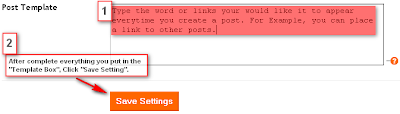 6. You will see something like the picture above, the "Post Template".
7. You can type anything into the box of "Post Template".
For Example:
Links of another relevant or related posts. Affiliate links, links to another blog/site, pictures, sentences and so on.
8. After you have completed filling in the box of "Post Template", go to "Posting" to create a new post. You will notice that anything you type into the box of "Post Template" will appear in your new post.
*This feature is good to create a lot of Inbound Links and you do not need to waste time to repeatedly type relevant links in every posts.
If you can make use of "Post Template" of Blogger.com, then it would save you plenty of time when you are writing new post.
Post Template can be found in your Blogger Account.
1. Login to your Blogger Account.
2. Click "Layout"(For New Blogger) or "Template"(Blogger Classic).
 3. Click "Setting".
4. Click on "Publishing" in "Setting" tab as shown on the picture above.
5. Scroll down to the lower page of "Publishing".
 6. You will see something like the picture above, the "Post Template".
7. You can type anything into the box of "Post Template".
For Example:
Links of another relevant or related posts. Affiliate links, links to another blog/site, pictures, sentences and so on.
8. After you have completed filling in the box of "Post Template", go to "Posting" to create a new post. You will notice that anything you type into the box of "Post Template" will appear in your new post.
*This feature is good to create a lot of Inbound Links and you do not need to waste time to repeatedly type relevant links in every posts.
Friday, May 18, 2007
Expandable post for Blogger
I have created an expandable post in this Earn Money From Blog. As you can see, there is a "Read More" link below this post. If you would like to know more about how I create this expandable post. Click the "Read the Full Post..." link to continue reading.
If you would like to create an expandable post like me. This is a good post to guide you.
Step 1:
1. Login to your Blogger Acount. Click on Layout on your blog. Click Edit HTML.
2. Go to find:

3. Copy the code below:
4. Paste the code between

and
5. Save Template.
Step 2:
1. Expand the Code.
2. Locate this code:

3. Paste the code below:
4. Follow the code correctly, if not the "Read more!" function will not function correctly.
5. Save template.
Step 3:
1. This is the last step.
2. Go to Settings------>Formatting. Scroll down to the end of the page to the box for the Post Template. Copy and Paste the following lines there :
3. Done!
Your posts will have "Read the Full Post..." function and this is good to make all your posts have their links in your blog. This is helping you to create a lot of inbound links in your blog.
If you would like to create an expandable post like me. This is a good post to guide you.
Step 1:
1. Login to your Blogger Acount. Click on Layout on your blog. Click Edit HTML.
2. Go to find:
3. Copy the code below:
4. Paste the code between

and

5. Save Template.
Step 2:
1. Expand the Code.
2. Locate this code:
3. Paste the code below:
4. Follow the code correctly, if not the "Read more!" function will not function correctly.
5. Save template.
Step 3:
1. This is the last step.
2. Go to Settings------>Formatting. Scroll down to the end of the page to the box for the Post Template. Copy and Paste the following lines there :
3. Done!
Your posts will have "Read the Full Post..." function and this is good to make all your posts have their links in your blog. This is helping you to create a lot of inbound links in your blog.
Sunday, May 13, 2007
Adding Extra Elements to Blogger's Blog Header
Normally, in Blogger we can only see our template lik the pictures below:

This post will teach you how to make the "Add a page Element" appear at the Header. After you apply the steps in this post, then you can add something into your header easily.
 Your Header will look like the picture above after making some changes to your blog's HTML.
Step-by-step Guide:
1. Login to your Blogger Account.
2. Click on "Layout" at the blog your want to make changes.
3. Then, click on "Edit HTML".
4. Now, here is a serious part. Try to find the code in the picture below:
 5. You can surely find it.
 6. Make changes to it. Change the maxwidget='1' to maxwidget='5' and change showaddelement='no' to showaddelement='yes'.
Finally, the code will look like pictures below:

Click to see larger picture.
7. After you have completed all this steps, "Save Template".
8. Go to your "Page Element" tab. You will find that you can "Add a page element" to your header.
9. This is useful especially if you want to place AdSense for Contents(Link Units) there.
Happy Blogging!!!
 blogroll
Subscribe to:
Posts (Atom)