Showing posts with label Facebook. Show all posts

Friday, July 22, 2011

Upgrade Your Facebook Blackberry Software With Chit Chat for Facebook


Recently, Daniel Offer, Managing Director of Athena IT Limited wrote to us inviting us to write about their latest incarnation of Chit Chat for Facebook - a port of their popular Windows application to the Blackberry.  You've probably heard of their Facebook chat desktop application for Windows, and this Facebook Blackberry IM app according to the company is intended to be the "bigger and better brother app" for Blackberry Smartphones.

Intrigued, I paid out my $1.99 and purchased a copy of Chit Chat for Facebook for my cherished Blackberry Bold 9780. I was  eager to see if the Facebook Blackberry chat app matches the hype  - and well, the picture perfect official Chit Chat for Facebook Blackberry website.

Once purchased, Chit Chat was awaiting me in my "downloads" folder on my Blackberry - the icon will be familiar to users of the desktop Windows application and is basically two pacman like C's standing for Chit Chat. After going through the normal software rigmarole of choosing my desired language and accepting an End User License Agreement I was asked to provide my login details.

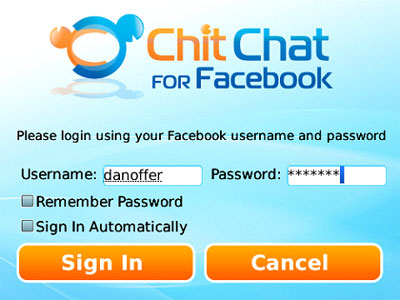
At this point I was instructed to enter my Facebook Username and password,  put simply - I didn't need to sign up for any additional services in order to do this like other applications I've used in the past. Although, if you don't already have a Facebook username, you'll need to create one.  That said, the instructions provided on how to create a Facebook username are fairly straight forward.  Although, you'll need access to a computer to be able to perform this step.

Once logged in I was presented with a list of my Facebook friends that were online and available to chat over Facebook chat. As an aside, there seem to be some people whom are always available on Facebook chat, at least on my buddy list. Back on to topic, the list is attractively presented on a green gradient with three tabs above it - three lists, buddy list, conversion list and unread chat messages. The touch pad enabled me to move up and down the contacts list, and left and right between tabs. Using Chit Chat feels very instinctive and effortless.

The menu button on your Blackberry allows you to select from a range of options, most of the options on this list you can more easily perform with keys on your blackberry,  with one exception,  preferences. The preference menu is only available via the menu button on your Blackberry.

Preferences is split into three sections - Conversation, Messages and Advanced. Dealing with the latter first, advanced preferences allows you to reset your settings as well as change your network configuration. More usefully, conversation and message preferences is home to a variety of functionality that enables you to customize the look and feel of this Blackberry Facebook chat software. 

'Message preferences' includes the ability to change the wall paper, add the time to messages, sort the buddy list and change the text size. Functionality that you'd normally expect from a Windows application, but not necessarily from a Blackberry app. Some brownie points for Chit Chat here.

My favorite features of this app are the ability to filter your friends on the buddy list and the  excellent message received alerts (it flashes the light on the Blackberry, vibrates and plays a jingle - although these can be turned off in preferences.

During my test I was able to stay logged into Facebook chat passively for several hours and then start using it actively without any issue arising. The Blackberry Facebook chat application feels solid and robust. One thing I felt was missing was the lack of the Facebook smiley's and them replaced with Chit Chat's own smiley graphics although that's probably a copyright thing more than anything else - there are substitutes for each of the Facebook emoticons .

In summary, Chit Chat for Facebook has moved from Windows to Blackberry in an elegant fashion.  Chit Chat for Facebook (Blackberry) is a best in class instant messaging app for the Blackberry and is recommended if you wish to use Facebook chat on your Blackberry Smartphone. It's available from Mobihand for $1.99 at the time of writing.

Upgrade Your Facebook Blackberry Software With Chit Chat for Facebook


Recently, Daniel Offer, Managing Director of Athena IT Limited wrote to us inviting us to write about their latest incarnation of Chit Chat for Facebook - a port of their popular Windows application to the Blackberry.  You've probably heard of their Facebook chat desktop application for Windows, and this Facebook Blackberry IM app according to the company is intended to be the "bigger and better brother app" for Blackberry Smartphones.

Intrigued, I paid out my $1.99 and purchased a copy of Chit Chat for Facebook for my cherished Blackberry Bold 9780. I was  eager to see if the Facebook Blackberry chat app matches the hype  - and well, the picture perfect official Chit Chat for Facebook Blackberry website.

Once purchased, Chit Chat was awaiting me in my "downloads" folder on my Blackberry - the icon will be familiar to users of the desktop Windows application and is basically two pacman like C's standing for Chit Chat. After going through the normal software rigmarole of choosing my desired language and accepting an End User License Agreement I was asked to provide my login details.

At this point I was instructed to enter my Facebook Username and password,  put simply - I didn't need to sign up for any additional services in order to do this like other applications I've used in the past. Although, if you don't already have a Facebook username, you'll need to create one.  That said, the instructions provided on how to create a Facebook username are fairly straight forward.  Although, you'll need access to a computer to be able to perform this step.

Once logged in I was presented with a list of my Facebook friends that were online and available to chat over Facebook chat. As an aside, there seem to be some people whom are always available on Facebook chat, at least on my buddy list. Back on to topic, the list is attractively presented on a green gradient with three tabs above it - three lists, buddy list, conversion list and unread chat messages. The touch pad enabled me to move up and down the contacts list, and left and right between tabs. Using Chit Chat feels very instinctive and effortless.

The menu button on your Blackberry allows you to select from a range of options, most of the options on this list you can more easily perform with keys on your blackberry,  with one exception,  preferences. The preference menu is only available via the menu button on your Blackberry.

Preferences is split into three sections - Conversation, Messages and Advanced. Dealing with the latter first, advanced preferences allows you to reset your settings as well as change your network configuration. More usefully, conversation and message preferences is home to a variety of functionality that enables you to customize the look and feel of this Blackberry Facebook chat software. 

'Message preferences' includes the ability to change the wall paper, add the time to messages, sort the buddy list and change the text size. Functionality that you'd normally expect from a Windows application, but not necessarily from a Blackberry app. Some brownie points for Chit Chat here.

My favorite features of this app are the ability to filter your friends on the buddy list and the  excellent message received alerts (it flashes the light on the Blackberry, vibrates and plays a jingle - although these can be turned off in preferences.

During my test I was able to stay logged into Facebook chat passively for several hours and then start using it actively without any issue arising. The Blackberry Facebook chat application feels solid and robust. One thing I felt was missing was the lack of the Facebook smiley's and them replaced with Chit Chat's own smiley graphics although that's probably a copyright thing more than anything else - there are substitutes for each of the Facebook emoticons .

In summary, Chit Chat for Facebook has moved from Windows to Blackberry in an elegant fashion.  Chit Chat for Facebook (Blackberry) is a best in class instant messaging app for the Blackberry and is recommended if you wish to use Facebook chat on your Blackberry Smartphone. It's available from Mobihand for $1.99 at the time of writing.

Thursday, July 14, 2011

How to activate/enable Video Chat on Your facebook

Enable video calls from Facebook ..

It's easy to enable your Facebook account given by the following procedure. Just follow and enjoy ...

**Go to Facebook video calling page and then click on “Get Started” button.


**After clicked on “Get Started” button, you would be asked by Facebook to select a friend from your chat to whom you want to make video call, so choose one.


**Download now wants to start the browser, download a video, Facebook Run the installation program. Exe video telephony and Facebook plug-ins installed on your computer and you may use at any time.

**Now every time you open Facebook Chat, click on the video camera as an icon in the session and make a video call, it's so easy!

How to activate/enable Video Chat on Your facebook

Enable video calls from Facebook ..

It's easy to enable your Facebook account given by the following procedure. Just follow and enjoy ...

**Go to Facebook video calling page and then click on “Get Started” button.


**After clicked on “Get Started” button, you would be asked by Facebook to select a friend from your chat to whom you want to make video call, so choose one.


**Download now wants to start the browser, download a video, Facebook Run the installation program. Exe video telephony and Facebook plug-ins installed on your computer and you may use at any time.

**Now every time you open Facebook Chat, click on the video camera as an icon in the session and make a video call, it's so easy!

Tuesday, July 5, 2011

EmoInstaller – A Charming Experience for Facebook Users


Emoinstaller is a plug-in for Facebook
Since its inception in 2004, Facebook has become more than a social networking tool. To date, Facebook has over 600 million users around the world. Facebook is frequently used for locating existing friends, making new ones, finding jobs and for advertisement of individuals’ capabilities. As a matter of fact, people love interactive chatting. Statistics shows that over a billion messages are sent on Facebook every day. Sometimes, during chat, one does not find the right words to express his or her emotions or feelings. Under that situation, Emoinstaller has provided the solution - use emoticons to convey your emotional feelings. Emoinstaller is a Facebook plug-in which integrates seamlessly into your web browser and adds hundreds of new emotion icons to your Facebook’s chat environment. The vast variety of these FB emoticons really makes the Facebook sessions lively and fascinating.

Key Characteristics of Emoinstaller
Emoinstaller is freely available software on the web. Unlike bulky graphic software, Emoinstaller is extremely lightweight application available for all versions of windows – from Windows XP to 7. It does not degrade your system performance. It is supported on most of the popular web browsers e.g. Internet explorer, Mozilla Firefox and Google Chrome. Remember, your friend on the other side of the Internet, must also have Emoinstaller installed on his / her system in order to see the icons you send. Fortunately, this plug-in takes just a few minutes to download and install.

The freeware offers you over 900 emoticons falling into fourteen different categories. If you are a lover or solider, son or father, daughter or mother; no matter whomever you are, Emoinstaller has something for you - something that will make you smile and amused. It has an iconic representation for almost each aspect of life.

The icons are available in different sizes - small, medium and large – and with a very large variety of animations. These visual effects are eye catching and grab attention of you partner. Furthermore, these icons can convey special messages of love and humor. There are smileys for special occasions and events, for example, Christmas emoticons – Santa, fairies, snowman and stocking feature.

How to install Emoinstaller?
From the official Emoinstaller website, you can directly install Emoinstaller by clicking on the download link and choosing Run from the dialog box. Alternatively, you can save it on your hard disk and install from there. Its installation is exactly like conventional Windows-based software packages.

How to use Emoinstaller?
After successful installation, restart your browser. Logon to Facebook with your email and password; Select one of your friends from the contact list and start chatting with him. You will find a monkey icon, representing Emoinstaller, on the upper left corner of the text box used for chatting. Click on this monkey icon to open the list of available emoticons and smileys. Select an icon and it will be pasted it into your chat window. That’s it.
Enhance Your Excitement
Emoinstaller has become a “must have” application for chat lovers. It adds extra flavor and versatility to chat sessions. Emoticons from diverse categories add excitement on both sides of the chat conversation and the sessions remain longer than usual. Animated smileys that wink, laugh or smile put special emphasis on messages.
Speedup Your Chatting
A single emoticon can represent several words or even complete sentences. Inclusion in the text messages or using independently, emoticons and smileys increase your chatting speed. You don’t need to be a good typist in the presence of a good collection of cool emoticons. You need high speed particularly when chatting with several friends at the same time.

Easiness in Vocabulary
People whom native tongue is not English don’t need to develop a large vocabulary for all kinds of emotions and feelings while chatting with their English fans. Emotions expressed through emoticons can be understood universally across the globe. So, thanks to these small pictures and icons that enable people to communicate with a minimum set of words; rather people can communicate even if they don’t know the language of each other.

Acquire the Emo-magic! Go and get Emoinstaller now to unfold the new frontiers of Facebook emoticons. It will add new dimensions to your chat experience. Don’t forget to ask your friends to get it installed on their systems. Enhance your chat sessions with high-quality emoticons for free!

- AUTHOR : Kim Davis

EmoInstaller – A Charming Experience for Facebook Users


Emoinstaller is a plug-in for Facebook
Since its inception in 2004, Facebook has become more than a social networking tool. To date, Facebook has over 600 million users around the world. Facebook is frequently used for locating existing friends, making new ones, finding jobs and for advertisement of individuals’ capabilities. As a matter of fact, people love interactive chatting. Statistics shows that over a billion messages are sent on Facebook every day. Sometimes, during chat, one does not find the right words to express his or her emotions or feelings. Under that situation, Emoinstaller has provided the solution - use emoticons to convey your emotional feelings. Emoinstaller is a Facebook plug-in which integrates seamlessly into your web browser and adds hundreds of new emotion icons to your Facebook’s chat environment. The vast variety of these FB emoticons really makes the Facebook sessions lively and fascinating.

Key Characteristics of Emoinstaller
Emoinstaller is freely available software on the web. Unlike bulky graphic software, Emoinstaller is extremely lightweight application available for all versions of windows – from Windows XP to 7. It does not degrade your system performance. It is supported on most of the popular web browsers e.g. Internet explorer, Mozilla Firefox and Google Chrome. Remember, your friend on the other side of the Internet, must also have Emoinstaller installed on his / her system in order to see the icons you send. Fortunately, this plug-in takes just a few minutes to download and install.

The freeware offers you over 900 emoticons falling into fourteen different categories. If you are a lover or solider, son or father, daughter or mother; no matter whomever you are, Emoinstaller has something for you - something that will make you smile and amused. It has an iconic representation for almost each aspect of life.

The icons are available in different sizes - small, medium and large – and with a very large variety of animations. These visual effects are eye catching and grab attention of you partner. Furthermore, these icons can convey special messages of love and humor. There are smileys for special occasions and events, for example, Christmas emoticons – Santa, fairies, snowman and stocking feature.

How to install Emoinstaller?
From the official Emoinstaller website, you can directly install Emoinstaller by clicking on the download link and choosing Run from the dialog box. Alternatively, you can save it on your hard disk and install from there. Its installation is exactly like conventional Windows-based software packages.

How to use Emoinstaller?
After successful installation, restart your browser. Logon to Facebook with your email and password; Select one of your friends from the contact list and start chatting with him. You will find a monkey icon, representing Emoinstaller, on the upper left corner of the text box used for chatting. Click on this monkey icon to open the list of available emoticons and smileys. Select an icon and it will be pasted it into your chat window. That’s it.
Enhance Your Excitement
Emoinstaller has become a “must have” application for chat lovers. It adds extra flavor and versatility to chat sessions. Emoticons from diverse categories add excitement on both sides of the chat conversation and the sessions remain longer than usual. Animated smileys that wink, laugh or smile put special emphasis on messages.
Speedup Your Chatting
A single emoticon can represent several words or even complete sentences. Inclusion in the text messages or using independently, emoticons and smileys increase your chatting speed. You don’t need to be a good typist in the presence of a good collection of cool emoticons. You need high speed particularly when chatting with several friends at the same time.

Easiness in Vocabulary
People whom native tongue is not English don’t need to develop a large vocabulary for all kinds of emotions and feelings while chatting with their English fans. Emotions expressed through emoticons can be understood universally across the globe. So, thanks to these small pictures and icons that enable people to communicate with a minimum set of words; rather people can communicate even if they don’t know the language of each other.

Acquire the Emo-magic! Go and get Emoinstaller now to unfold the new frontiers of Facebook emoticons. It will add new dimensions to your chat experience. Don’t forget to ask your friends to get it installed on their systems. Enhance your chat sessions with high-quality emoticons for free!

- AUTHOR : Kim Davis

Wednesday, June 15, 2011

P & G to open Facebook Store, enter the next days of Facebook

According to Social Commerce Web site reports, Procter & Gamble through Facebook, to open six Facebook Store.

We have been concerned about all aspects of Facebook, it seems that the news of the arrival, indicating a Facebook e-commerce will be staged drama. P & G as our consumers end consumer products company, has, like Gillette, Procter & Gamble's consumer brands that are excellent. Facebook trend towards the transformation of e-commerce has become increasingly evident, first through the shop, which allows more people to sell products through Facebook, then, Facebook may shop from which they earn a profit, this in turn is a multibillion-dollar class opportunity, gorgeous "next days." There's now even possible to go beyond the heyday of the Procter & Gamble.

More interesting is, P & G companies are carried out through joint ventures PFS Web, a B2B e-commerce platform company and other companies to suggest they can help them through Facebook e-commerce. Look, P & G is scheduled to Facebook e-commerce plan to eat a piece of cake it?


P & G to open Facebook Store, enter the next days of Facebook

According to Social Commerce Web site reports, Procter & Gamble through Facebook, to open six Facebook Store.

We have been concerned about all aspects of Facebook, it seems that the news of the arrival, indicating a Facebook e-commerce will be staged drama. P & G as our consumers end consumer products company, has, like Gillette, Procter & Gamble's consumer brands that are excellent. Facebook trend towards the transformation of e-commerce has become increasingly evident, first through the shop, which allows more people to sell products through Facebook, then, Facebook may shop from which they earn a profit, this in turn is a multibillion-dollar class opportunity, gorgeous "next days." There's now even possible to go beyond the heyday of the Procter & Gamble.

More interesting is, P & G companies are carried out through joint ventures PFS Web, a B2B e-commerce platform company and other companies to suggest they can help them through Facebook e-commerce. Look, P & G is scheduled to Facebook e-commerce plan to eat a piece of cake it?


Tuesday, May 31, 2011

shop.org: 35% of users intend to buy goods on facebook

Chart: Shop Social Media 2011 - How Shoppers InteractW/Retailers_lg

Tags:
Shop Social Media 2011 - How Shoppers InteractW/Retailers_lg
Powered By: iCharts | create, share, and embed interactive charts online
Shop.org recently released e-commerce in 2011 social survey , the report survey was conducted in April 2011 1787 U.S. adult online shoppers. Here are some data in the report:

42% of U.S. adult Internet users through facebook, twitter or blog or subscribe to the retailers follow the brand;

The average American adult Internet users follow6 retailers brand, 58% of the followers is mainly to get a special discount, 49% of the image to obtain the latest product information, while 39% want to participate in the activities of these brands or competitions;

56% of facebook users click on the article by adding retail brand facebook site;

28% of facebook users through a link on facebook to buy goods;

47% of mobile phones and other mobile devices through the shop's customers view comments (34% of facebook users at least once a day via mobile phones and other mobile terminals to access facebook, 32% once a day via mobile phone to access youtube);

19% of U.S. adult Internet users buy goods from the buy site -57% of users spend more than 100 dollars;

35% of consumers will purchase products from the facebook, 32% of users are willing to buy goods from a twitter;

16% of U.S. adult Internet users know foursquare, and even fewer know that yelp, and only 10%, Gowalla 6%;

shop.org: 35% of users intend to buy goods on facebook

Chart: Shop Social Media 2011 - How Shoppers InteractW/Retailers_lg

Tags:
Shop Social Media 2011 - How Shoppers InteractW/Retailers_lg
Powered By: iCharts | create, share, and embed interactive charts online
Shop.org recently released e-commerce in 2011 social survey , the report survey was conducted in April 2011 1787 U.S. adult online shoppers. Here are some data in the report:

42% of U.S. adult Internet users through facebook, twitter or blog or subscribe to the retailers follow the brand;

The average American adult Internet users follow6 retailers brand, 58% of the followers is mainly to get a special discount, 49% of the image to obtain the latest product information, while 39% want to participate in the activities of these brands or competitions;

56% of facebook users click on the article by adding retail brand facebook site;

28% of facebook users through a link on facebook to buy goods;

47% of mobile phones and other mobile devices through the shop's customers view comments (34% of facebook users at least once a day via mobile phones and other mobile terminals to access facebook, 32% once a day via mobile phone to access youtube);

19% of U.S. adult Internet users buy goods from the buy site -57% of users spend more than 100 dollars;

35% of consumers will purchase products from the facebook, 32% of users are willing to buy goods from a twitter;

16% of U.S. adult Internet users know foursquare, and even fewer know that yelp, and only 10%, Gowalla 6%;

Friday, May 27, 2011

Sign up for Facebook, no two record labels Spotify is still needed in the United States launched


There are some interesting speculation regarding the relationship between hot music streaming service Spotify's social platform and a huge up for Facebook! .Forbes now reports that, Facebook has with a streaming service Spotify, "may launch in a few weeks, the two" icon in the user through the Spotify news copy.

However, our source is the idea of ​​pouring ice cold water. The reason is this: even if Spotify is doing very well, its home turf in Sweden ... and introduced in Finland, France, the Netherlands, Norway, Spain and the UK - it is not already in the U.S.. Introduced in the next two weeks look very promising.

Our sources say, because Spotify's record company secured the fact that two unnamed - but need more than two labels on the train before they can launch in the United States.

Source : If you like my article please don't forget to follow : twitter, Facebook

Sign up for Facebook, no two record labels Spotify is still needed in the United States launched


There are some interesting speculation regarding the relationship between hot music streaming service Spotify's social platform and a huge up for Facebook! .Forbes now reports that, Facebook has with a streaming service Spotify, "may launch in a few weeks, the two" icon in the user through the Spotify news copy.

However, our source is the idea of ​​pouring ice cold water. The reason is this: even if Spotify is doing very well, its home turf in Sweden ... and introduced in Finland, France, the Netherlands, Norway, Spain and the UK - it is not already in the U.S.. Introduced in the next two weeks look very promising.

Our sources say, because Spotify's record company secured the fact that two unnamed - but need more than two labels on the train before they can launch in the United States.

Source : If you like my article please don't forget to follow : twitter, Facebook

Saturday, May 21, 2011

Facebook Posts depending on the location and population


Facebook has several options to control and own friends list, photos, biographies you have many options for privacy settings in your profile to ensure visibility in various areas of the profile control of the filter. Well now you can also choose who to show your Posts on Facebook.


In favor of the follower pages you admin, you can choose countries and places where people strength be clever to perceive a post. You can use these options for each update on Facebook. If the status area, click the lock icon and select Customize. Now You’ll have a privacy, with people you like, you can choose the face in particular. You can choose from pop, friends, friends of friends, or just a few. 

The selection of a particular person,lets you enter the names of your friends who will be able to see your post. You can also filter the e-mail from your friends.These characteristics of the target is also very useful for those areas. You can select post to users by country and language. Open the management page and click on the padlock before sending updates to the site. 


You can also set the city or province inside the countries where the post will be visible.  You can also direct users to a specific language. You can add languages that will filter the post only to the speakers of the language within your preferred location.

By customize your posts on your follower pages; you can simply object your particular products by country, constituency or languages.


Facebook Posts depending on the location and population


Facebook has several options to control and own friends list, photos, biographies you have many options for privacy settings in your profile to ensure visibility in various areas of the profile control of the filter. Well now you can also choose who to show your Posts on Facebook.


In favor of the follower pages you admin, you can choose countries and places where people strength be clever to perceive a post. You can use these options for each update on Facebook. If the status area, click the lock icon and select Customize. Now You’ll have a privacy, with people you like, you can choose the face in particular. You can choose from pop, friends, friends of friends, or just a few. 

The selection of a particular person,lets you enter the names of your friends who will be able to see your post. You can also filter the e-mail from your friends.These characteristics of the target is also very useful for those areas. You can select post to users by country and language. Open the management page and click on the padlock before sending updates to the site. 


You can also set the city or province inside the countries where the post will be visible.  You can also direct users to a specific language. You can add languages that will filter the post only to the speakers of the language within your preferred location.

By customize your posts on your follower pages; you can simply object your particular products by country, constituency or languages.


Thursday, May 19, 2011

Hardening from Facebook, Google rolls in the world of social research

Google will be a bit 'controversial features 19 other languages ​​to launch a survey next week the company announced on its official blog. Released in October 2009, social research is a normal feature of the results of publicly available data of your friends joins Social Media operations.

Yes, friends, vaguely defined and are the ones talking buddy list, contacts, Google, People, Buzz and Google Reader below, and others were linked to their profile on Google or a Google Account. Google can be your friends through public networks such as Twitter and Facebook and collect data from their connection.

This function is the subject of recent controversies, such as Facebook and public relations employees of negative stories in the press on the search online for printing. Facebook claims that Google's privacy practices is very important, and it is unfortunate that Google, Facebook share data to support it, without your consent.

For the most part, Google has not commented on the issue, but it is clear that in his recent blog Twitter Social Search, the three times, and Facebook is not visible. Social Search is available in 19 languages ​​in multiple languages, on the road next week. Watch a video preview of the steps below.


Hardening from Facebook, Google rolls in the world of social research

Google will be a bit 'controversial features 19 other languages ​​to launch a survey next week the company announced on its official blog. Released in October 2009, social research is a normal feature of the results of publicly available data of your friends joins Social Media operations.

Yes, friends, vaguely defined and are the ones talking buddy list, contacts, Google, People, Buzz and Google Reader below, and others were linked to their profile on Google or a Google Account. Google can be your friends through public networks such as Twitter and Facebook and collect data from their connection.

This function is the subject of recent controversies, such as Facebook and public relations employees of negative stories in the press on the search online for printing. Facebook claims that Google's privacy practices is very important, and it is unfortunate that Google, Facebook share data to support it, without your consent.

For the most part, Google has not commented on the issue, but it is clear that in his recent blog Twitter Social Search, the three times, and Facebook is not visible. Social Search is available in 19 languages ​​in multiple languages, on the road next week. Watch a video preview of the steps below.


Facebook five free applications for Android phones

Although it is relatively easy to find and list to go to the Android Market for you, you want a small task. If you're looking for and Facebook Fan androids This list can be useful for you. I was five Facebook application that can be used to download and it's worth.

Facebook for Android With this application you can do updates on the main screen to display messages and view events. Listen to your friends walls', the information about you and talking with friends. You can also upload photos, check-in on a busy film to watch and see if the incoming messages. This free application had 10000000-50000000 objects.

This management application Seesmic social media to find updates on Facebook, other social networks like Twitter, Buzz, too. You can also update their Facebook pages to admin


Go! Chat with this user-friendly interface, Facebook Chat is very easy to use and easier. You can share pictures and videos as well as the location, pictures and voice messages via chat. Other features include emoticons, Facebook groups, favorites, etc. registration


Video on Facebook application to download video download video clips from your phone to your Facebook profile. When the movie is downloaded, will be updated on a wall. So do not feel that the measures are characteristic of those who download movies, you can still find interesting.

SyncMyPix not really apply, but hey, if you want pictures of your contacts from your phone. The application synchronizes contacts from Facebook photos with the contacts of their camera phone.
 
This does not apply to all applications that can be used to improve management. Send us your thoughts about the questions that we think a lot about Facebook. Then download the application to think that they deserve, and work safely.

Facebook five free applications for Android phones

Although it is relatively easy to find and list to go to the Android Market for you, you want a small task. If you're looking for and Facebook Fan androids This list can be useful for you. I was five Facebook application that can be used to download and it's worth.

Facebook for Android With this application you can do updates on the main screen to display messages and view events. Listen to your friends walls', the information about you and talking with friends. You can also upload photos, check-in on a busy film to watch and see if the incoming messages. This free application had 10000000-50000000 objects.

This management application Seesmic social media to find updates on Facebook, other social networks like Twitter, Buzz, too. You can also update their Facebook pages to admin


Go! Chat with this user-friendly interface, Facebook Chat is very easy to use and easier. You can share pictures and videos as well as the location, pictures and voice messages via chat. Other features include emoticons, Facebook groups, favorites, etc. registration


Video on Facebook application to download video download video clips from your phone to your Facebook profile. When the movie is downloaded, will be updated on a wall. So do not feel that the measures are characteristic of those who download movies, you can still find interesting.

SyncMyPix not really apply, but hey, if you want pictures of your contacts from your phone. The application synchronizes contacts from Facebook photos with the contacts of their camera phone.
 
This does not apply to all applications that can be used to improve management. Send us your thoughts about the questions that we think a lot about Facebook. Then download the application to think that they deserve, and work safely.