
Showing posts with label wordpress. Show all posts

Wednesday, July 20, 2011

How to make a widget from your Google+ profile


Like other social networks (Facebook, LinkedIn, etc.), Google + allows you to create a widget from your profile, as a sort of badge of their information. The novelty is that now began to appear some plugins directed to him. 

The plugin Script Google + Profile + widget, for example, allows you to add on your website or your blog Wordpress + Google widget. In it, you will see your photo, a box to add it to the network, and also the possibility to activate the links for available networks in your profile.

In Step by step we will see below how to add and add the widget to your website or blog in Wordpress:

Step 1. Sign in to your account and download the Wordpress plugin on this link;

Step 2. Extract the files into the Plugins folder (located inside the folder of wp-content root of your site or blog);


Step 3. On the control panel of your website or blog, enable the plugin Script Profile + Google Widget;

Step 4. Widgets menu, drag the plugin to the sidebar panel. Fill in your details:

Googe + ID: is the number that appears on the link in your profile Google +;
Width: the width (in pixels) that the widget must have;
Domain: the domain of your site or blog;
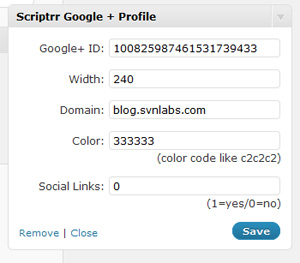
Color: the background color of the widget (in hexadecimal);
Social links: here you can choose to expose them or not.

Step 5. Click "Save" and your widget is ready!

The plugin is currently available for those who have their own domains (wordpress.org). For blogs hosted on wordpress.com (blog.wordpress.com), there is not expected to be available.

How to make a widget from your Google+ profile


Like other social networks (Facebook, LinkedIn, etc.), Google + allows you to create a widget from your profile, as a sort of badge of their information. The novelty is that now began to appear some plugins directed to him. 

The plugin Script Google + Profile + widget, for example, allows you to add on your website or your blog Wordpress + Google widget. In it, you will see your photo, a box to add it to the network, and also the possibility to activate the links for available networks in your profile.
In Step by step we will see below how to add and add the widget to your website or blog in Wordpress:

Step 1. Sign in to your account and download the Wordpress plugin on this link;

Step 2. Extract the files into the Plugins folder (located inside the folder of wp-content root of your site or blog);


Step 3. On the control panel of your website or blog, enable the plugin Script Profile + Google Widget;

Step 4. Widgets menu, drag the plugin to the sidebar panel. Fill in your details:

Googe + ID: is the number that appears on the link in your profile Google +;
Width: the width (in pixels) that the widget must have;
Domain: the domain of your site or blog;
Color: the background color of the widget (in hexadecimal);
Social links: here you can choose to expose them or not.

Step 5. Click "Save" and your widget is ready!

The plugin is currently available for those who have their own domains (wordpress.org). For blogs hosted on wordpress.com (blog.wordpress.com), there is not expected to be available.

Tuesday, June 7, 2011

Html5/css3 Wordpress 3.1+ theme : Yoko

I am pleased to review another wordpress theme, called Yoko. I am really Appreciate yoko designers they are very talented peoples. Those names are Ellen and Manuel from elmastudio and they are released for the web design community. This theme is absolutely free to use in commercial projects and private also.

Yoko is a stylish and flexible wordpress theme with approachable layout, based on css3 media queries, this theme is auto adjusts to different screen resolution.


Download theme:

The design is optimized for large desktop screens, tablets and mini smart phones. Make your blog more creatures that will be able you to use your own logo, header, background and link color also.


This theme is released under GPL. You can use any type of projects for free, NO restrictions. You can also change your theme if you wish.

Theme features:

Theme requires wordpress 3.1+

Well matched cross browsers (Checked with chrome

HTML5 (with fallback for IE < 9) and CSS3

Approachable layout (css3 media queries, not supported in IE9, You can apply libraries like respond.js and css3-mediaqueries-js, made it work in older versions of IE.

WordPress post formats (aside, gallery, image, video, link and quote)

You can use your own background, header options and submenu also.

Social media support to promote your rss feed.

Full width page template

You can use google web fonts (droid sans and droid serif)

Comments with gravatar support

Extra: multiple columns, info boxes with three colors and highlighted text

Presently available in English, German and French.

Screen shots:

Three-Column-Layout.
Two-Column-Layout.
One-Column-Layout.
Comments area.
Custom Header.
Post Format Gallery.
Theme Options.
I hope, it is very useful for u…. (Please follow : twitter | facebook )

Html5/css3 Wordpress 3.1+ theme : Yoko

I am pleased to review another wordpress theme, called Yoko. I am really Appreciate yoko designers they are very talented peoples. Those names are Ellen and Manuel from elmastudio and they are released for the web design community. This theme is absolutely free to use in commercial projects and private also.

Yoko is a stylish and flexible wordpress theme with approachable layout, based on css3 media queries, this theme is auto adjusts to different screen resolution.


Download theme:

The design is optimized for large desktop screens, tablets and mini smart phones. Make your blog more creatures that will be able you to use your own logo, header, background and link color also.


This theme is released under GPL. You can use any type of projects for free, NO restrictions. You can also change your theme if you wish.

Theme features:

Theme requires wordpress 3.1+

Well matched cross browsers (Checked with chrome

HTML5 (with fallback for IE < 9) and CSS3

Approachable layout (css3 media queries, not supported in IE9, You can apply libraries like respond.js and css3-mediaqueries-js, made it work in older versions of IE.

WordPress post formats (aside, gallery, image, video, link and quote)

You can use your own background, header options and submenu also.

Social media support to promote your rss feed.

Full width page template

You can use google web fonts (droid sans and droid serif)

Comments with gravatar support

Extra: multiple columns, info boxes with three colors and highlighted text

Presently available in English, German and French.

Screen shots:

Three-Column-Layout.
Two-Column-Layout.
One-Column-Layout.
Comments area.
Custom Header.
Post Format Gallery.
Theme Options.
I hope, it is very useful for u…. (Please follow : twitter | facebook )

Monday, June 6, 2011

Free wordpress theme 3.1: splendio (psd)

I am happy to inform you; I got one wordpress theme, that's very beautiful, this theme made by vlad and elena. The theme is free to use in both private and commercial projects.


About this template:

Upper part:

News slider for the special articles and main area can contain the content of your latest articles.

Right side:

You'll find overview of latest Articles and latest tweets and something of your website promotion related.

Upper right side part:

This features shown your latest comments of your website and you can also put any promotional widget.

Gallery:

In case you wish to showcase your latest photos have an option above the footer. You can place widgets like a filker.

Extra:

Color theme is blue and there you can place your widgets such as pages, categories and others. A soft upper part and middle part and strong footer are the special of this theme...

Download wordpress template:


Screen shots :

The footer area.
Main content area.

The comments area.
Thank you smashing magazine and Vlad and Elena!

Written by anand (twitter)

Free wordpress theme 3.1: splendio (psd)

I am happy to inform you; I got one wordpress theme, that's very beautiful, this theme made by vlad and elena. The theme is free to use in both private and commercial projects.


About this template:

Upper part:

News slider for the special articles and main area can contain the content of your latest articles.

Right side:

You'll find overview of latest Articles and latest tweets and something of your website promotion related.

Upper right side part:

This features shown your latest comments of your website and you can also put any promotional widget.

Gallery:

In case you wish to showcase your latest photos have an option above the footer. You can place widgets like a filker.

Extra:

Color theme is blue and there you can place your widgets such as pages, categories and others. A soft upper part and middle part and strong footer are the special of this theme...

Download wordpress template:


Screen shots :

The footer area.
Main content area.

The comments area.
Thank you smashing magazine and Vlad and Elena!

Written by anand (twitter)